PVP
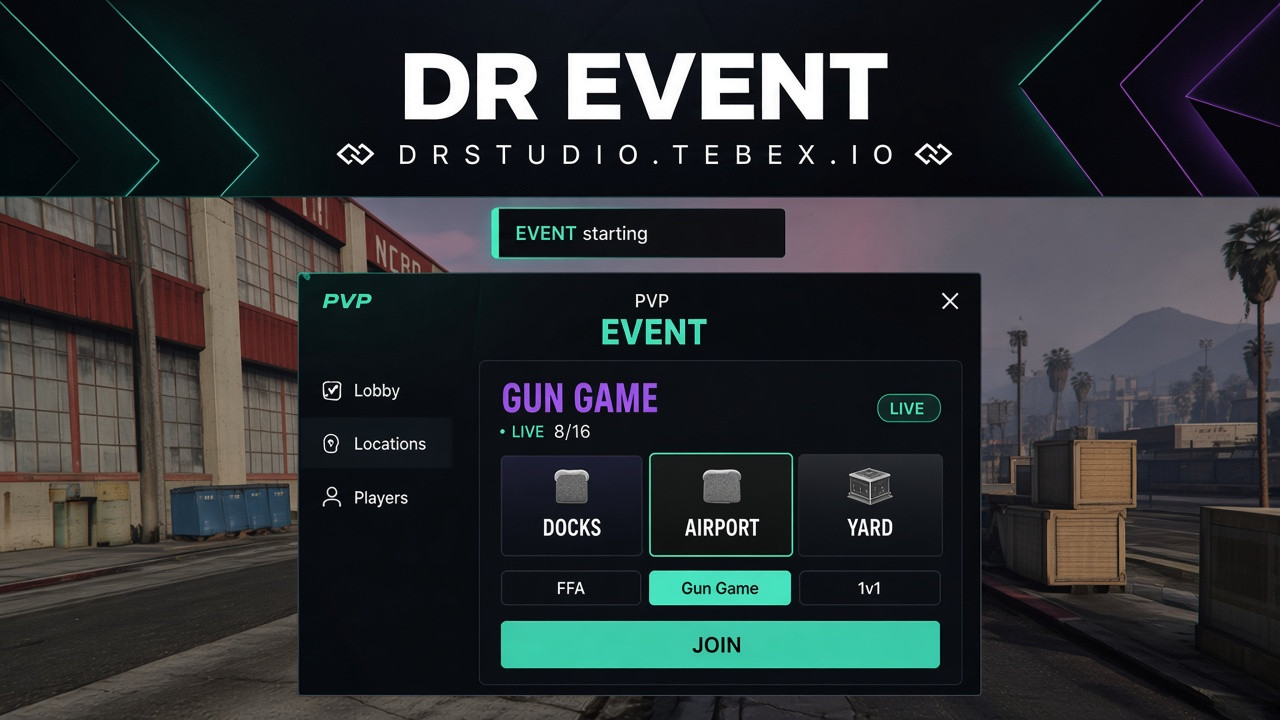
Event menu
✦ Modern FiveM Event System
Create and manage server events through one modern and easy-to-use interface.
Give your staff full control over event creation, player registration, announcements, winners and rewards — all from a single admin panel.
Create. Manage. Compete. Reward.
🎯 Create Your Own Events
Admins can quickly create a new event and configure everything players need to know.
Set:
- Event name
- Event location
- Event mode
- Maximum players
- Event information
- Registration settings
- Other event options
Players can then view the event and join directly through the event menu.
👥 Player Registration
Players can easily join available events through the UI.
Admins can see who has joined the event and keep track of registered players.
- Player list
- Registered players
- Player count
- Event status
- Join / Leave system
- Admin player overview
🔒 Lock Events
Once an event is ready to start, admins can lock the event.
After locking:
- New players can no longer join
- Existing participants remain registered
- Admins can continue managing the event
- Event status is clearly displayed
📢 Admin Announcements
Admins can send custom announcements directly through the event panel.
Use announcements for:
- Event start
- Important instructions
- Participant information
- Warnings
- Match updates
- Winner announcements
Players receive the information through the custom notification system.
🏆 Declare the Winner
When the event is finished, admins can select and announce the winner directly from the event menu.
The system uses a custom notification to announce the winner to players.
For example:
🏆 EVENT WINNER
Congratulations to PlayerName for winning the event!
🎮 Multiple Event Modes
Create different types of competitive events.
Supported modes can include:
- 1v1
- 2v2
- Custom team modes
- Other configurable event modes
⭐ XP Rewards
Winning an event isn't just about being first.
When an admin declares the winner, the winner can receive a configurable amount of XP as a reward.
The XP is then added to the player's progression and can be used to unlock rewards through the Battle Pass.
🎟️ Battle Pass Integration
The Event System can work together with the Battle Pass system, allowing event winners to earn XP that can be used for Battle Pass progression.
Players can use their earned XP to:
- Progress through Battle Pass levels
- Unlock rewards
- Access XP Shop rewards
- Continue progressing through the server's reward system
Battle Pass:
View Battle Pass – DR Studio
🖥️ Modern UI
Everything is managed through a clean and modern interface.
Players can view:
- Available events
- Event information
- Location
- Event mode
- Participants
- Event status
- Join / Leave options
Admins receive additional controls for managing the entire event.
🛡️ Admin Panel
Staff members have access to dedicated event management tools.
Admins can:
- Create events
- Edit event settings
- Set event locations
- View participants
- Send announcements
- Lock events
- Manage event status
- Select the winner
- Award XP
- Manage event modes
⚙️ Fully Configurable
Customize the system to fit your server.
Configure:
- Event modes
- XP rewards
- Notifications
- Event settings
- Player limits
- Admin permissions
- UI settings
- Locations
- Other event options
🚀 Create Events. Manage Players. Reward Winners.
A complete event management system designed for FiveM servers.
From creating the event to managing participants, announcing the winner and rewarding them with XP — everything is handled in one place.
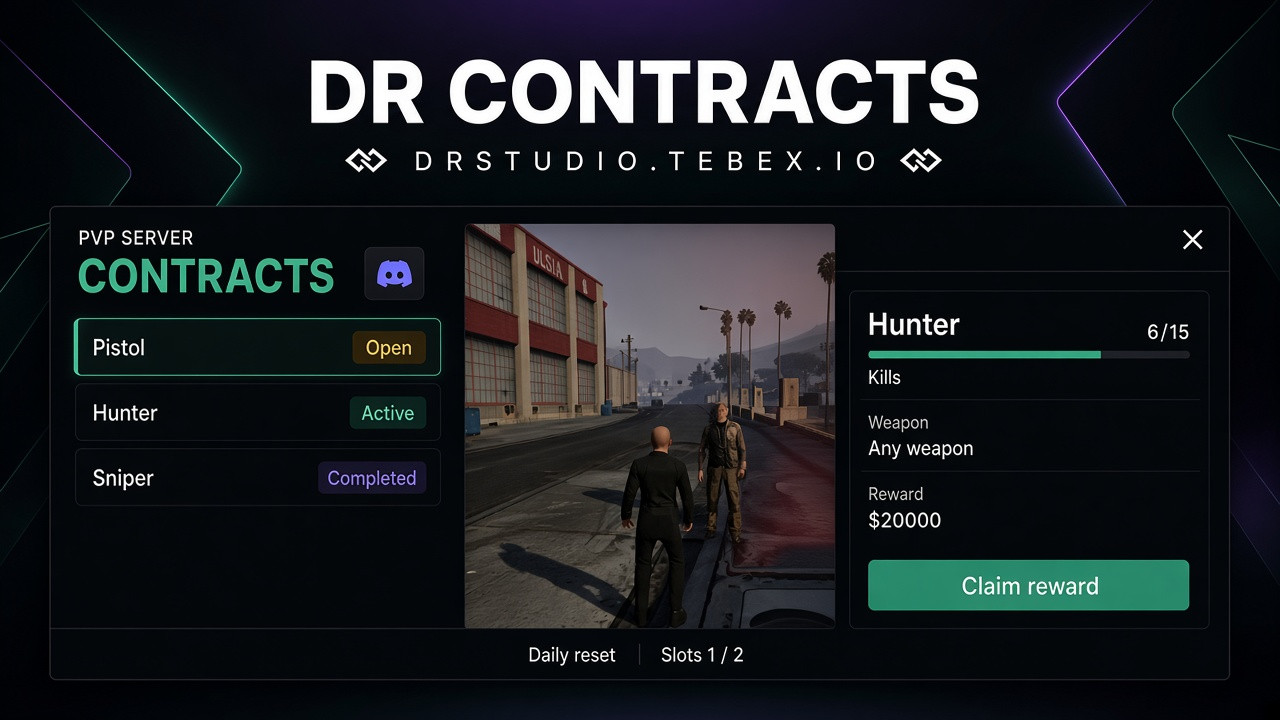
PVP Contract
✦ Modern FiveM Contract System
Give your players a new way to earn rewards through a modern and fully customizable Contract System.
Players can view available challenges, complete their objectives and claim the rewards they have earned.
Complete challenges. Earn rewards. Keep progressing.
🖥️ Custom Contract UI
A completely custom interface designed to make challenges easy to browse and track.
- Modern custom UI
- Available contracts
- Contract progress
- Objectives
- Rewards
- Completion status
- Easy-to-use interface
- Fully customizable design
🎯 Complete Challenges
Contracts give players different objectives to complete while playing on your server.
Challenges can be created around different types of gameplay, allowing you to reward players for completing specific tasks.
For example:
- Get a certain number of kills
- Play for a specific amount of time
- Complete specific activities
- Reach a required amount of progress
- Complete other configured objectives
🎁 Configurable Rewards
Every contract can have its own reward.
Once a player completes the required objective, they can receive the configured reward.
Rewards can include:
- 💰 Money
- 🎁 Items
- ⭐ Experience
- 🏆 Other configurable rewards
Create different contracts with different difficulty levels and rewards.
📊 Progress Tracking
Players can easily see how far they are from completing their current contracts.
The UI can display:
Current Progress
Required Progress
Completion Status
Available Reward
This makes it clear what the player needs to do next.
⚙️ Fully Configurable
Create contracts that fit your server and its gameplay.
Customize:
- Contract names
- Descriptions
- Objectives
- Required progress
- Rewards
- Contract availability
- Completion requirements
- UI appearance
- And more
🚀 Give Players Something to Complete
Keep your players engaged with challenges that reward them for actively playing on your server.
Custom UI. Configurable Challenges. Progress Tracking. Custom Rewards.
Create challenges, set the rewards and let your players work towards completing them.
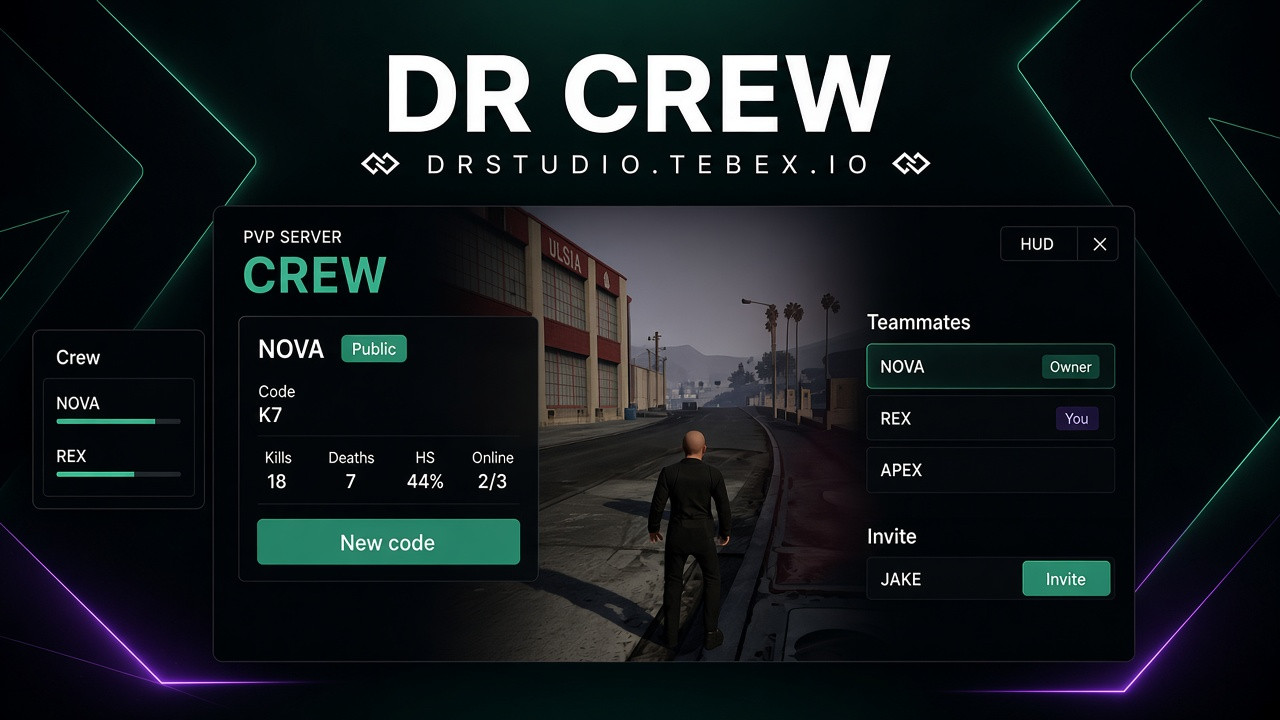
Crew system
✦ Modern FiveM Crew System
Create your own crew and build your team with a modern and fully customizable Crew System for FiveM.
Manage your members, customize your Crew HUD, track statistics and control exactly who can join your crew.
Create. Manage. Compete. Build your crew.
🖥️ Custom Crew UI
A completely custom interface designed to make managing your crew simple and intuitive.
- Modern custom UI
- Crew overview
- Member list
- Crew statistics
- Individual member statistics
- Crew management
- Invitation system
- Join code system
- Fully customizable design
🎨 Custom Crew HUD
Keep your crew information visible while playing with a dedicated Crew HUD.
The HUD can display information such as:
- Crew name
- Crew tag
- Online members
- Crew members
- Crew statistics
- Other configurable information
The Crew HUD can be moved freely around the screen, allowing every player to position it exactly where they want it.
🔐 Private Crews
Want to keep your crew exclusive?
Enable Private Crew mode and control who can join.
Private crews can prevent unwanted players from joining and give crew owners more control over their community.
👥 Invite & Join System
Multiple ways to invite players to your crew.
Direct Invitations
Invite individual players directly through the Crew System.
Join Code
Generate a unique Crew Join Code and share it with the players you want to invite.
Players can use the code to join the crew without needing a direct invitation.
🚫 Crew Name Blacklist
Keep your server's crew names clean and appropriate.
The configurable Crew Name Blacklist prevents players from creating crews with prohibited or inappropriate names.
Add your own blocked words and phrases to the blacklist according to your server's rules.
📊 Crew Statistics
Track your crew's progress and activity with detailed statistics.
Display information such as:
- 💀 Total kills
- ☠️ Total deaths
- 🎯 K/D ratio
- ⏱️ Total playtime
- 👥 Number of members
- 🟢 Online members
- And other configurable statistics
👤 Individual Member Statistics
See how each member contributes to the crew.
Individual statistics can include:
- Kills
- Deaths
- K/D ratio
- Playtime
- Activity
- Other configurable stats
This makes it easy to see which members are active and how they contribute to the crew.
⚙️ Crew Management
Give crew owners and authorized members control over their crew.
Manage:
- Crew members
- Invitations
- Join codes
- Private / public status
- Crew name
- Crew settings
- Member information
- Statistics
🚀 Build Your Crew
Create your own team, invite your friends and track your progress together.
Custom UI. Custom Crew HUD. Private Crews. Join Codes. Statistics.
Everything you need to create and manage your own crew on your FiveM server.
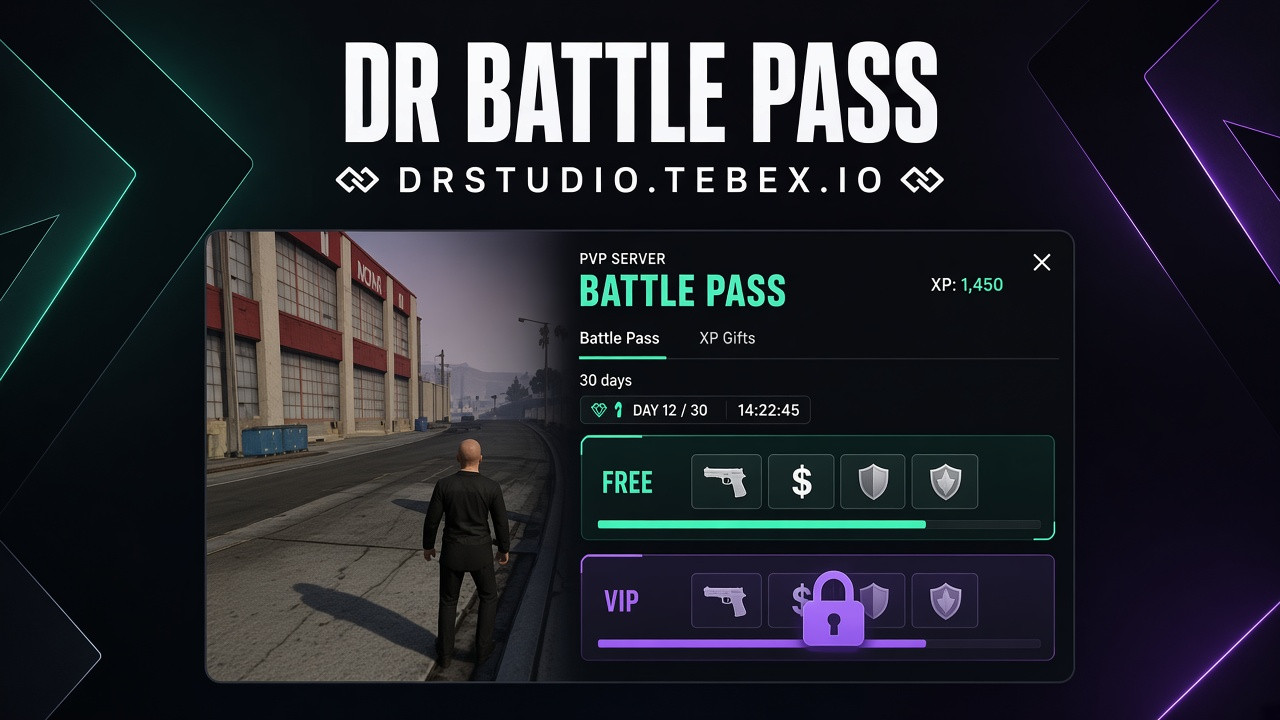
Battle Pass
✦ Modern FiveM Battle Pass
Give your FiveM server a complete Battle Pass system with progression, rewards, XP challenges and an integrated XP Shop — all accessible through one modern UI.
Play. Earn XP. Level up. Unlock rewards.
🎟️ Battle Pass System
Create a progression system that gives players a reason to keep playing and earning XP.
- Modern Battle Pass UI
- Level-based progression
- XP system
- Configurable rewards
- Multiple progression methods
- Free & Premium rewards
- Customizable levels
- Automatic progression
- Everything managed through one UI
⭐ Earn XP
Players can earn XP through different activities on your server.
For example:
- 🔫 Getting kills
- 🏆 Winning events
- ⏱️ Play time
- 🎯 Completing activities
- 🎉 Participating in events
- ⚙️ Other configurable actions
XP rewards can be configured to match your server's gameplay and progression speed.
🛒 XP Shop
Turn earned XP into rewards with the integrated XP Shop.
Players can spend their XP on configurable items and rewards directly from the Battle Pass UI.
Configure your own:
- Items
- Weapons
- Money rewards
- Special rewards
- XP prices
- Shop categories
- Purchase limits
🎁 Battle Pass Rewards
Reward players as they progress through the Battle Pass.
Each level can have its own configurable reward, allowing you to create a progression system that fits your server.
Rewards can include:
- Items
- Weapons
- Money
- Custom rewards
- Special server rewards
🖥️ One Complete UI
Everything is accessible through one modern and clean interface.
Players can view:
- Current Battle Pass level
- XP progress
- Available rewards
- XP Shop
- Progression
- Free rewards
- Premium rewards
- Other Battle Pass information
No unnecessary menus or complicated interfaces.
⚙️ Fully Configurable
The entire system is designed to be easily customized.
Configure:
- XP rewards
- Kill XP
- Event win XP
- Play time XP
- Battle Pass levels
- Rewards
- XP Shop
- XP prices
- Free & Premium rewards
- UI settings
- Progression settings
- Other Battle Pass options
🚀 Keep Your Players Progressing
Give players a reason to play, earn XP and unlock new rewards.
One UI. One progression system. Endless possibilities.
Build your own Battle Pass experience for your FiveM server.
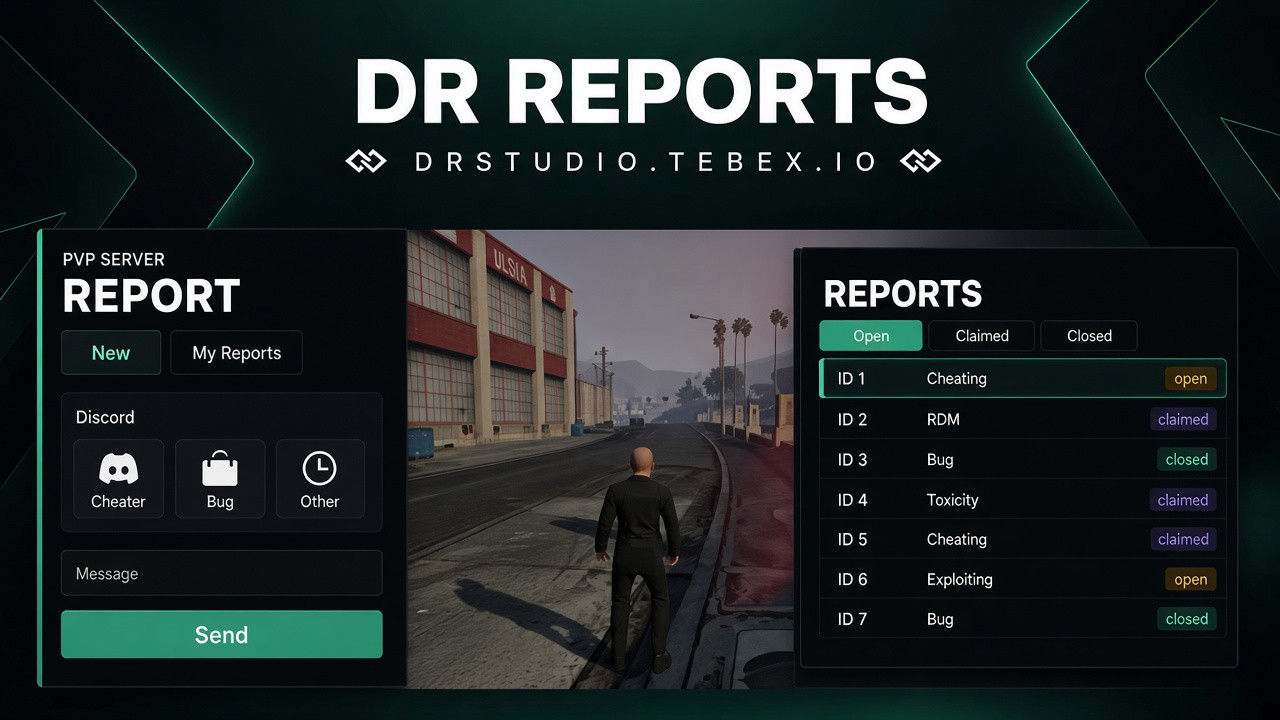
Reports
✦ Modern FiveM Report System
Give your staff a fast and modern way to handle player reports with a custom in-game interface, real-time updates, Discord logging and powerful tools for resolving situations directly from the report menu.
Clean for players. Powerful for staff. Fully customizable for your server.
🎫 Three Report Types
Players can easily create a report by choosing the type that best matches their situation.
👤 Player
Report another player for rule violations, inappropriate behavior or other issues.
🐛 Bug
Report bugs, glitches or technical problems found on the server.
❓ Question
Ask staff a question or request help with something on the server.
Each report can contain a custom message and additional information to help staff understand the situation.
🖥️ Custom Report UI
Forget the default report systems.
The script comes with a fully custom in-game UI designed to make reports easy to create, manage and review.
- Modern custom interface
- Report list
- Detailed report view
- Report conversations
- Real-time updates
- Report status management
- Player information
- Easy navigation
- Fully configurable design
📸 Screenshot System
Give your staff more context when dealing with reports.
When a report is created or updated, screenshots can be captured and displayed directly inside the report menu.
The report author can see the submitted screenshots directly in-game, allowing players to provide visual evidence without having to leave the server.
🔔 Real-Time Notifications
Staff never have to constantly check the report menu.
The notification system alerts authorized staff whenever:
- A new report is created
- A player sends a new message
- A report is updated
- New information is added to a report
This makes it easier for staff to respond quickly and keep track of active situations.
👮 Powerful Staff Tools
Give your staff the tools they need to investigate and resolve reports directly from the report interface.
Depending on permissions, staff can use actions such as:
- ❄️ Freeze player
- 📍 Teleport to player
- 🚀 Bring player
- 👁️ Spectate player
- 🔎 View player information
- 🔓 Unfreeze player
- 🗑️ Close report
- 🔄 Update report status
- 💬 Respond directly to the player
- And much more
All staff actions can be permission-based and configured for different staff ranks.
💬 Report Conversations
Reports aren't just simple messages.
Players and staff can communicate directly through the report conversation, allowing everyone involved to keep the entire situation in one place.
When a player or staff member sends a new message, authorized staff are notified immediately.
📋 Discord Logging
Keep your staff team informed even outside the game.
Reports and important actions can be logged directly to Discord, giving your team an overview of what happened.
Logging can include:
- New reports
- Report updates
- Messages
- Report status changes
- Staff actions
- Report closures
- Other important report activity
⚙️ Configuration
The system is designed to fit your server and your staff structure.
Customize settings such as:
- Report types
- UI appearance
- Colors
- Permissions
- Staff access
- Notifications
- Report statuses
- Discord logging
- Staff actions
- Screenshot settings
- And more
🚀 A Better Way to Handle Reports
Stop relying on basic report commands.
Give your players an easy way to contact staff and give your team everything they need to handle reports efficiently.
Custom UI. Real-time notifications. Screenshots. Discord logging. Powerful staff tools.
Everything your server needs to manage reports in one place.
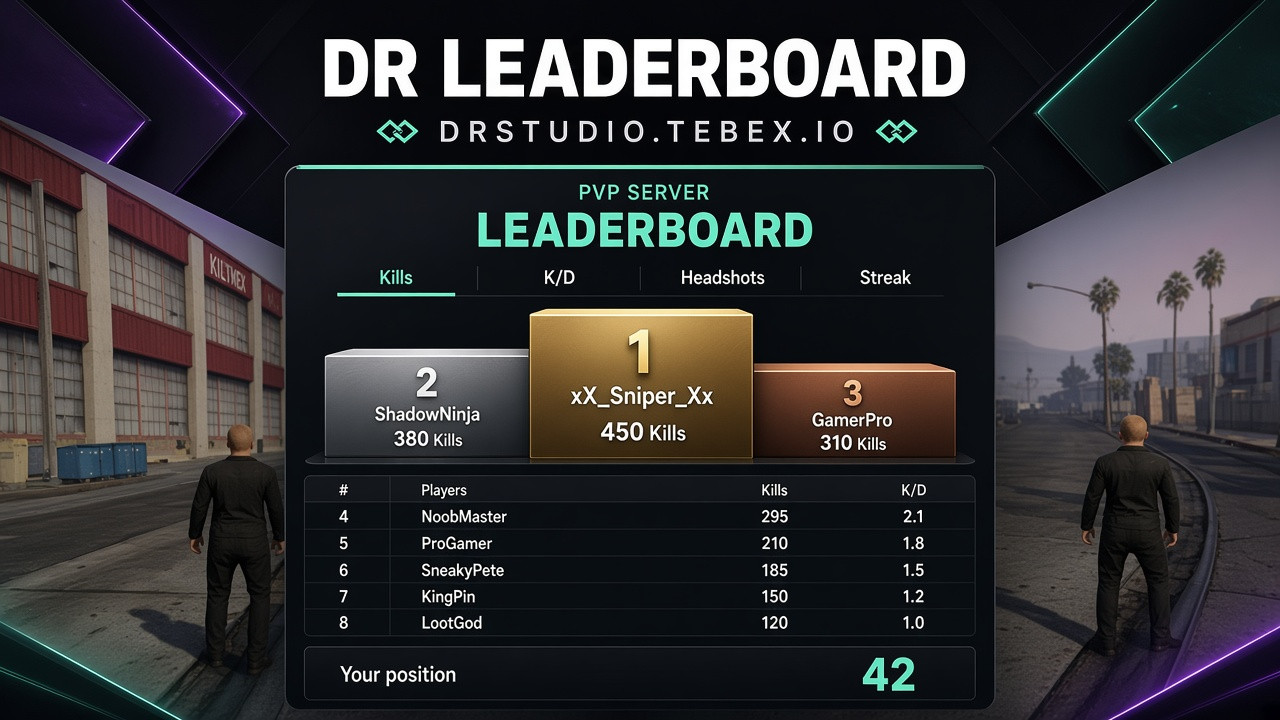
Leaderboard
✦ Modern FiveM Leaderboard
Give your FiveM server a complete leaderboard system with multiple ranking categories, a custom UI and Discord integration.
Compete. Improve. Climb the leaderboard.
🏆 Multiple Leaderboards
Track player performance across different categories with one complete leaderboard system.
Available leaderboards can include:
- 🏆 Overall Leaderboard
- 🎯 Headshot Leaderboard
- 🔥 Kill Streak Leaderboard
- ☠️ Kill Leaderboard
- 💀 Death Leaderboard
- ⚔️ K/D Leaderboard
- 🏅 Win Leaderboard
- ⭐ Other custom statistics
Create different categories depending on what you want to track on your server.
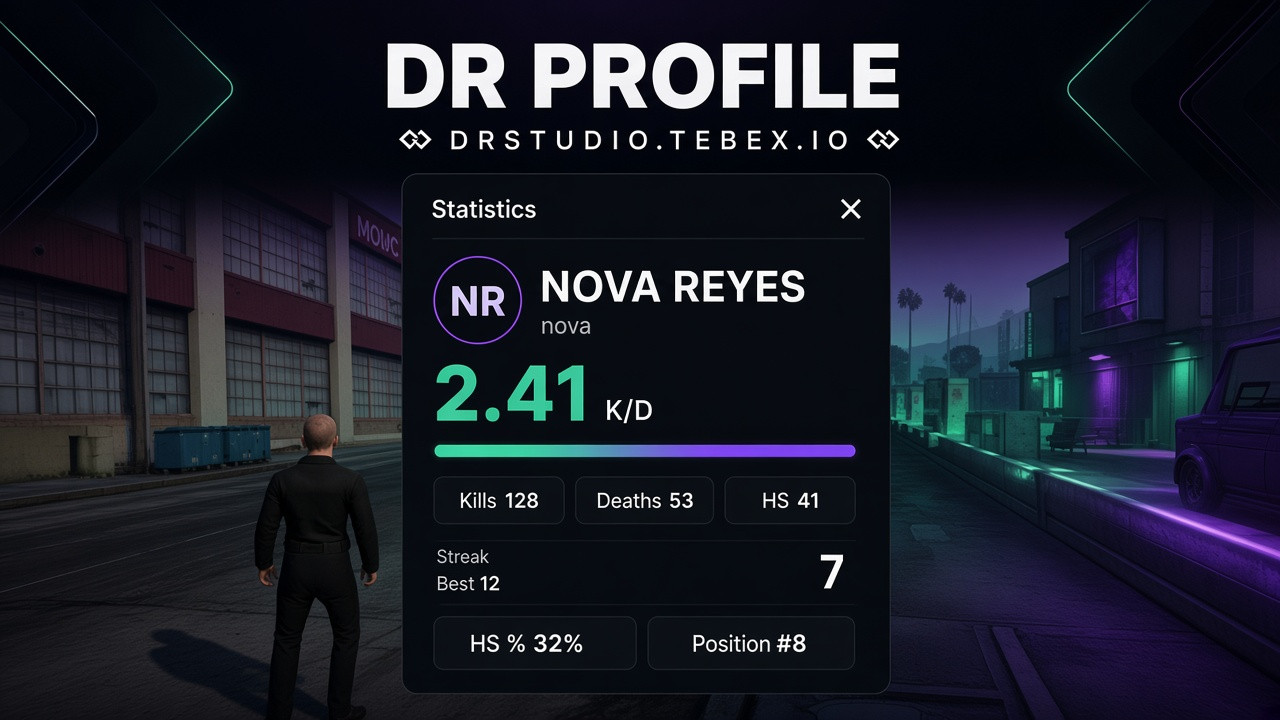
📊 Player Statistics
Players can see their performance and compare their statistics with other players.
Display information such as:
- Kills
- Deaths
- K/D
- Headshots
- Kill Streak
- Wins
- Losses
- Overall position
- Other configurable statistics
🎨 Custom UI
The leaderboard comes with a custom and modern interface designed to fit your server's style.
- Clean UI
- Modern design
- Custom colors
- Player rankings
- Statistics overview
- Smooth animations
- Easy-to-read layout
🔗 Discord Integration
Connect your leaderboard with your Discord server.
Discord integration can be used to display or share leaderboard information and keep your community updated with player rankings.
Players can easily see who is currently leading the server and compete for the top positions.
🥇 Ranking System
Players are automatically ranked based on their statistics.
The leaderboard can display:
#1 — PlayerName
#2 — PlayerName
#3 — PlayerName
and continue with the remaining players.
Different leaderboard categories can have their own rankings.
⚙️ Fully Configurable
Customize the leaderboard to match your server.
Configure:
- Leaderboard categories
- Statistics
- Ranking system
- UI appearance
- Colors
- Displayed information
- Discord integration
- Update settings
- Other leaderboard options
🚀 Compete for the Top
Give your players another reason to improve their performance and compete with the rest of the server.
Track the stats. Climb the rankings. Become #1.
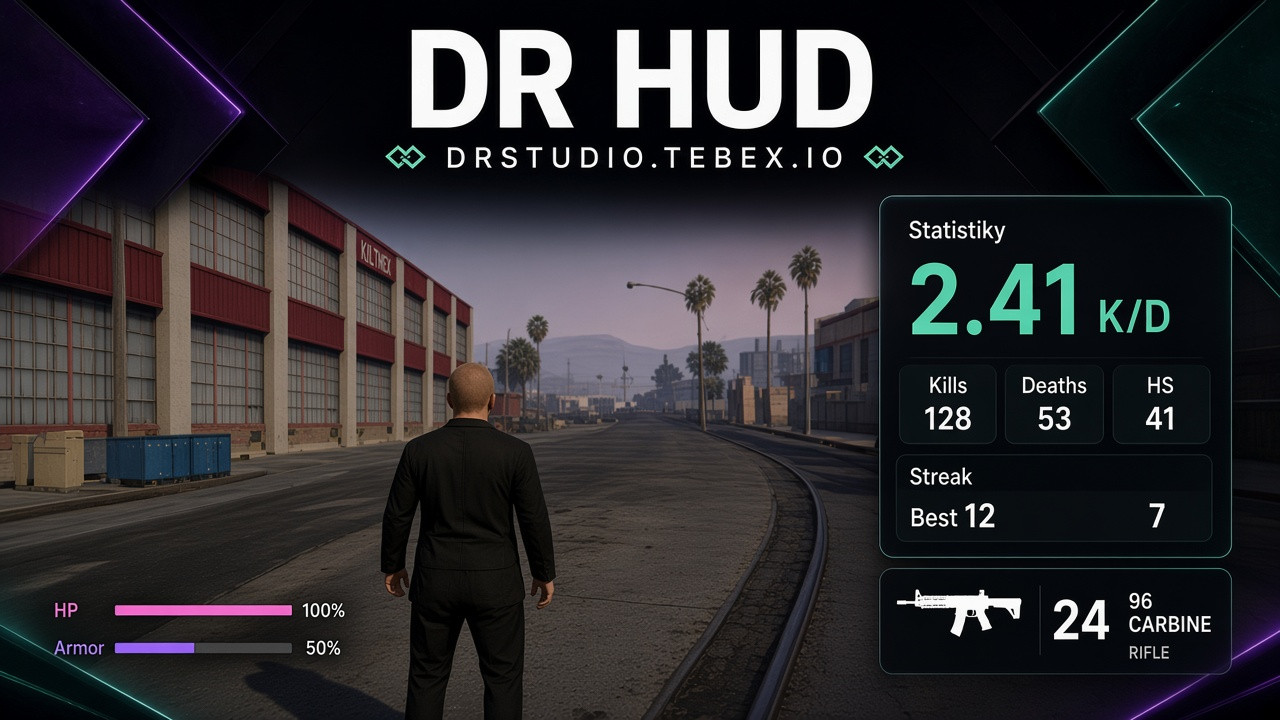
PVP Hud
✦ Modern FiveM HUD
Give your FiveM server a clean and modern HUD designed to provide players with all the important information they need without getting in the way of gameplay.
With a fully custom UI, dedicated weapon HUD and detailed player statistics, everything is presented in one consistent and modern interface.
Clean design. Useful information. Fully customizable.
🖥️ Custom HUD UI
Replace the standard FiveM HUD with a completely custom interface built around your server's style.
- Modern custom UI
- Clean and minimal design
- Player information
- Status indicators
- Vehicle information
- Configurable elements
- Smooth animations
- Fully customizable appearance
🔫 Custom Weapon HUD
Keep important weapon information visible while you're in combat.
The custom weapon HUD can display:
- Current weapon
- Ammo count
- Magazine ammo
- Total ammunition
- Weapon information
- Custom weapon icons
- Configurable layout
Everything is designed to remain clear and easy to read without unnecessarily blocking the screen.
📊 Player Statistics
Give players a dedicated interface where they can see their important statistics.
The statistics UI can display information such as:
- 💀 Kills
- ☠️ Deaths
- 🎯 K/D ratio
- ⏱️ Playtime
- 💰 Money
- 💼 Job
- ⭐ Level
- 🆔 Player ID
- And other configurable statistics
The statistics displayed can be adjusted to fit your server's gameplay and economy.
🎨 Fully Customizable
Make the HUD match your server's branding and overall UI.
Customize:
- Colors
- UI layout
- HUD elements
- Weapon HUD
- Statistics
- Icons
- Text
- Positions
- Animations
- Visibility
- And more
⚡ Clean & Lightweight
The HUD is designed to provide important information while keeping the interface clean and unobtrusive.
Only the information you need is displayed, allowing players to focus on the actual gameplay.
🚀 Upgrade Your Server's HUD
Replace the basic FiveM HUD with a modern interface built around your server.
Custom UI. Custom Weapon HUD. Player Statistics.
Everything your players need, presented in one clean and modern HUD.
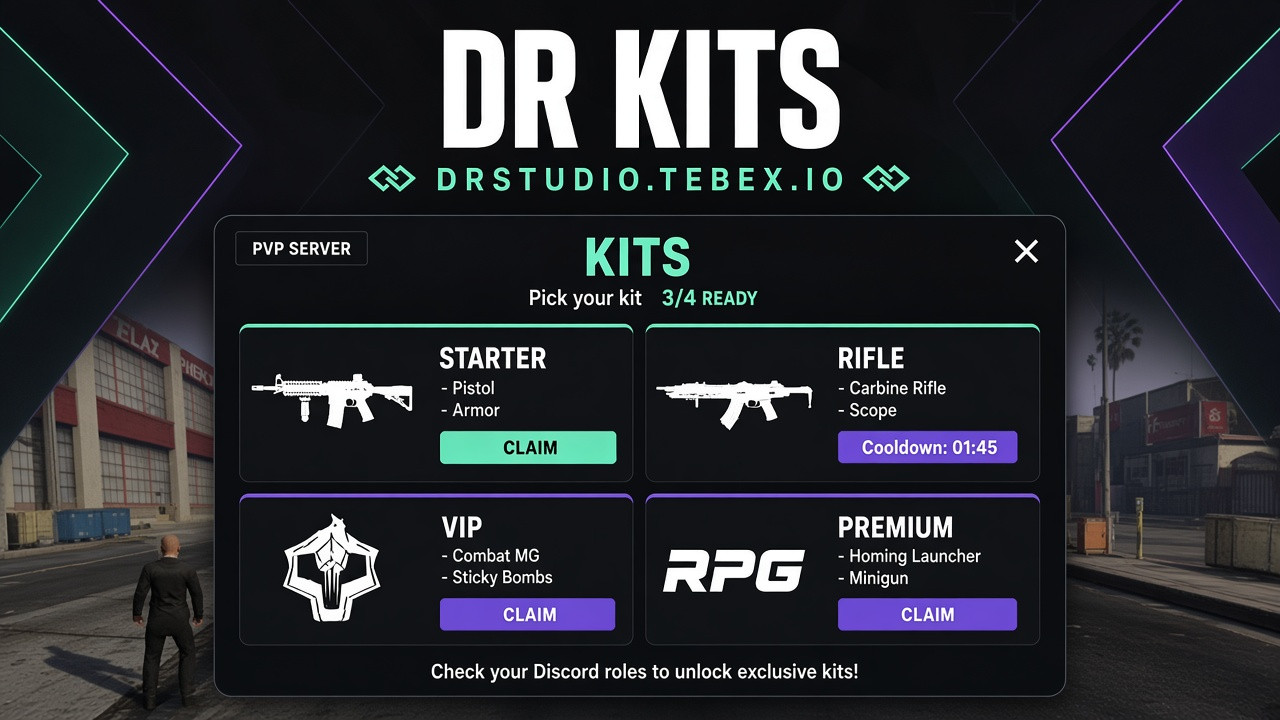
Kits sytem
✦ Modern FiveM Kit System
Give your players an easy way to claim scheduled rewards through one simple and modern Kit menu.
Choose your kit. Claim your rewards. Come back when it's ready.
🎁 Kit Menu
Players can access all available kits from one clean and simple UI.
The system offers 4 different reward packages, with each package having its own rewards and cooldown.
Players can choose from:
- 🎒 Basic Kit — Available to everyone
- 💎 VIP Kit
- 👑 VIP Plus Kit
- 🔥 VIP Premium Kit
Only one kit can be claimed at a time, depending on the player's access and cooldown.
⏱️ Claim Cooldowns
Each kit can have its own configurable cooldown.
Once a player claims a kit, they need to wait until the cooldown expires before claiming it again.
The menu clearly shows:
- Available kit
- Claim status
- Remaining cooldown
- Required permission
- Available rewards
👤 VIP Kits
Three of the four kits are designed specifically for VIP players.
This allows you to create additional rewards and benefits for your server's VIP ranks.
For example:
Basic Kit
Available to all players.
VIP Kit
Exclusive rewards for VIP players.
VIP Plus Kit
More valuable rewards for higher VIP ranks.
VIP Premium Kit
The highest-tier reward package.
🎁 Custom Rewards
Every kit can contain its own configurable rewards.
Possible rewards include:
- Items
- Weapons
- Money
- Ammo
- Custom rewards
- Other server-specific rewards
Create different reward packages based on your server's economy and VIP structure.
🖥️ Simple UI
Everything is available through one modern Kit menu.
Players can easily see:
- Available kits
- Kit name
- Rewards
- Cooldown
- VIP requirement
- Claim button
- Current claim status
⚙️ Fully Configurable
Configure the entire system to fit your server.
Customize:
- Kit names
- Rewards
- Cooldowns
- VIP requirements
- Permissions
- Kit availability
- UI appearance
- Notifications
- Other kit settings
🚀 Simple Rewards. One Menu. Four Kits.
Give your players a simple way to claim regular rewards while providing additional benefits to your VIP community.
One Basic Kit for everyone. Three exclusive VIP Kits. Fully configurable.
Multicharacter
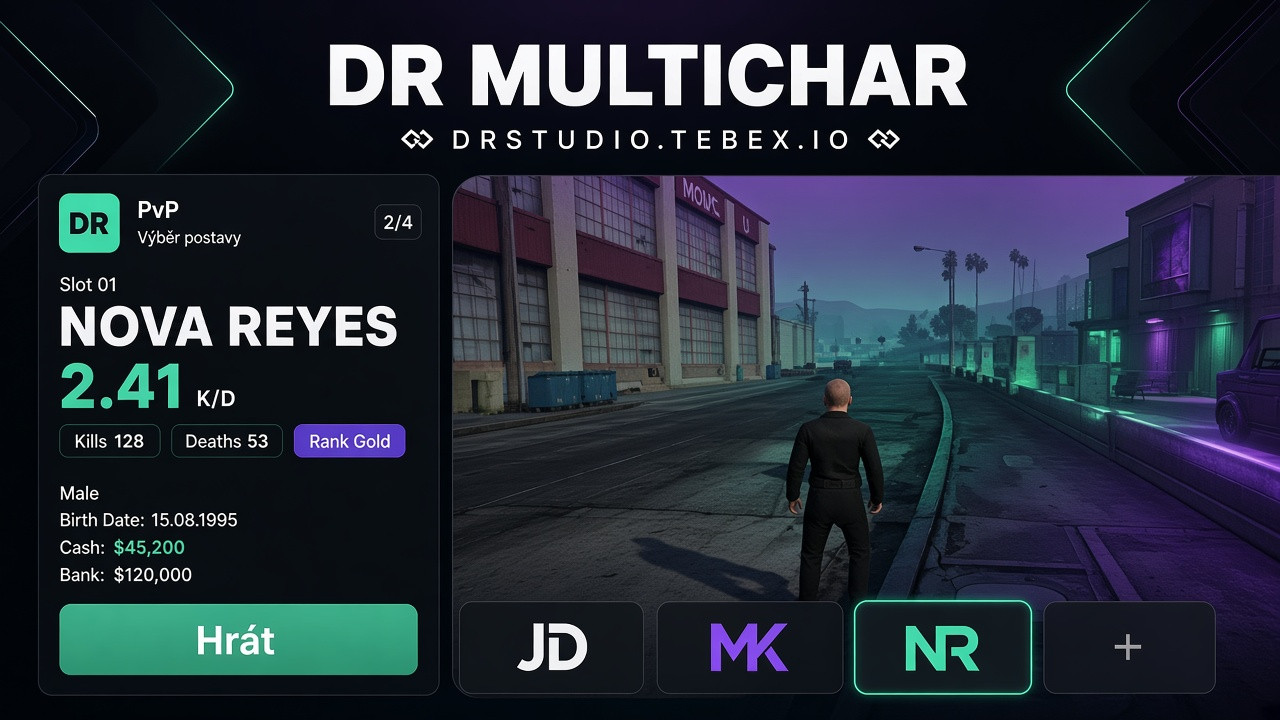
✦ Modern FiveM Multi Character
Give your FiveM server a modern Multi Character system with a clean custom UI and detailed character statistics.
Multiple characters. One clean interface. Your story starts here.
👤 Character Selection
Allow players to easily manage and select their characters through a modern and intuitive interface.
- Custom character selection UI
- Character previews
- Character names
- Character information
- Multiple character slots
- Easy character switching
- Clean and responsive design
📊 Character Statistics
Each character can display detailed statistics directly in the character selection menu.
Players can see information such as:
- 🔫 Kills
- 💀 Deaths
- 🎯 Headshots
- ⚔️ K/D
- 🏆 Wins
- 🔥 Kill Streak
- ⏱️ Play Time
- 💰 Other character statistics
Additional statistics can be added depending on your server setup.
🎨 Custom UI
The entire Multi Character system features a custom-designed interface.
- Modern UI
- Clean layout
- Character-focused design
- Custom colors
- Smooth animations
- Custom backgrounds
- Easy-to-read statistics
- Responsive interface
🧑🤝🧑 Multiple Characters
Give players the ability to create and manage multiple characters from one menu.
Each character can have their own:
- Name
- Appearance
- Statistics
- Progression
- Character information
- Other server data
⚙️ Fully Configurable
Customize the system to fit your server's design and gameplay.
Configure:
- Character slots
- UI appearance
- Colors
- Statistics
- Character information
- Backgrounds
- Animations
- Other settings
🚀 Choose Your Character. See Your Progress.
A modern Multi Character system designed to make character selection more detailed, visual and enjoyable.
Multiple characters. Detailed statistics. One custom UI.
Scoreboard
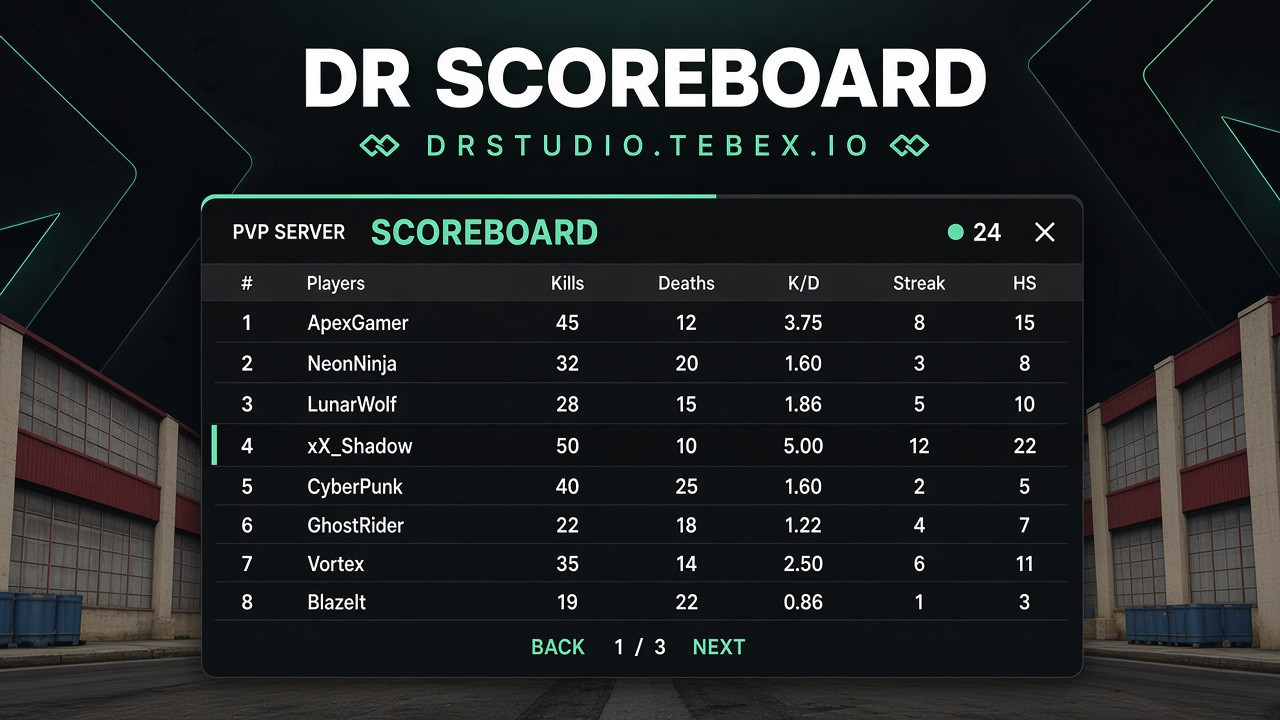
✦ Modern FiveM Scoreboard
Give your FiveM server a modern and interactive scoreboard with a custom UI, Discord integration and detailed player statistics.
Display your players in a clean interface while automatically connecting their Discord profiles directly to the scoreboard.
Modern design. Discord integration. Player statistics. Everything in one place.
🖥️ Custom Scoreboard UI
Replace the default player list with a completely custom scoreboard designed specifically for your server.
- Modern custom UI
- Clean and responsive design
- Player list
- Player search
- Player information
- Online player count
- Easy navigation
- Fully customizable appearance
🔗 Discord Integration
Connect your FiveM server with Discord and make your scoreboard more personal.
Players can have their Discord profile picture displayed directly next to their name.
The scoreboard can use Discord information to make it easier for staff and players to identify people currently online.
- Discord profile pictures
- Discord account integration
- Player ↔ Discord connection
- Automatic profile picture loading
- Clean Discord-style player identification
📊 Player Statistics
Give players more information than just their server ID.
The scoreboard can display useful statistics for each player, such as:
- Player ID
- Player name
- Job
- Job grade
- Playtime
- Kills
- Deaths
- Ping
- Other configurable statistics
Statistics can be displayed directly in the player list or inside a detailed player view.
👤 Player Profile
Click on a player to open their detailed profile.
Display information such as:
Discord Profile Picture
Player Name
Server ID
Job
Playtime
Statistics
Ping
The profile layout can be customized to match the style of your server.
🔎 Easy Player Overview
Find the player you're looking for quickly.
The scoreboard can provide tools such as:
- Player search
- ID search
- Job filtering
- Detailed player information
- Online player count
- Player sorting
Perfect for both regular players and staff members.
🎨 Fully Customizable
Make the scoreboard fit your server's branding.
Customize:
- UI design
- Colors
- Player cards
- Statistics
- Profile layout
- Discord integration
- Displayed information
- Animations
- Fonts
- And more
⚡ Lightweight & Optimized
The scoreboard is designed to provide a smooth experience without unnecessarily affecting server performance.
Only the required information is displayed and updated, keeping the interface responsive even on larger servers.
🚀 Upgrade Your Server's Player List
Forget the basic FiveM player list.
Give your players a modern scoreboard with Discord profile pictures, detailed statistics and a custom interface designed around your server.
Custom UI. Discord Integration. Player Profiles. Statistics.
Everything your players need to see who's online.
PVP Profile
✦ Modern FiveM Logging System
Keep track of everything happening on your FiveM server with a powerful and fully configurable logging system.
The script is designed to centralize your server logs into one easy-to-manage system, giving you a complete overview of player activity, staff actions, resources and important server events.
One system. One configuration. Complete server visibility.
📋 Log Everything
Track important actions happening across your server and send them directly to Discord.
The system can be used to log events such as:
- 👤 Player actions
- 👮 Staff actions
- 🎫 Reports
- 🎁 Event Menu
- 🎟️ Battle Pass
- 💰 Economy actions
- 🎒 Inventory actions
- 🔫 Weapon actions
- 🚗 Vehicle actions
- 💼 Jobs
- 🏦 Banking
- 🛒 Shops
- 🛡️ Punishments
- 🔄 Relogs
- And much more
New logging categories can easily be added to your server as needed.
⚙️ One Central Configuration
No more searching through multiple resources just to change a Discord webhook.
The entire logging system can be configured from one central configuration file.
Manage your logs in one place, including:
- Discord Webhooks
- Log channels
- Enabled / disabled logs
- Log colors
- Log titles
- Log messages
- Player information
- Staff information
- Timestamps
- Resource-specific logs
- And more
Keep your server's entire logging setup organized and easy to maintain.
🔗 Resource Integration
The logging system is designed to work alongside your other resources.
Connect logs from systems such as:
Event Menu
Battle Pass
Reports
Admin Menu
Inventory
Vehicles
Jobs
Banking
Shops
Punishments
And many more.
This allows you to keep different systems connected to one centralized logging solution.
📡 Discord Logging
Important server activity can be sent directly to your Discord server using customizable webhooks.
Create separate channels for different types of activity, for example:
#player-logs
#admin-logs
#reports
#economy-logs
#vehicle-logs
#inventory-logs
#punishment-logs
Keep everything organized and easy for your staff team to review.
👮 Staff & Player Information
Logs can contain detailed information about the action that occurred.
Depending on the event, logs can include:
- Player name
- Server ID
- License / identifier
- Discord information
- Staff member
- Action performed
- Target player
- Amounts
- Items
- Vehicles
- Coordinates
- Timestamp
- Additional event information
Give your staff the context they need when reviewing server activity.
🎨 Custom Log Design
Make your Discord logs match your server's style.
Customize:
- Embed colors
- Titles
- Descriptions
- Footer
- Icons
- Webhooks
- Channels
- Logged information
- Message format
Create a consistent logging system across your entire server.
🔥 Built for Large Servers
Whether you are running a small community or a large FiveM server, the system provides a centralized way to monitor what's happening behind the scenes.
Instead of having separate logging systems scattered across different resources, bring everything together into one organized solution.
🚀 One Logging System. Everything You Need.
Monitor your server. Track important actions. Keep your staff informed.
From Reports and Battle Pass to Admin Actions, Economy, Inventory and Events — keep your server activity organized in one powerful Discord logging system.
Fully configurable. Centralized. Expandable. Built for your FiveM server.
Loading screen
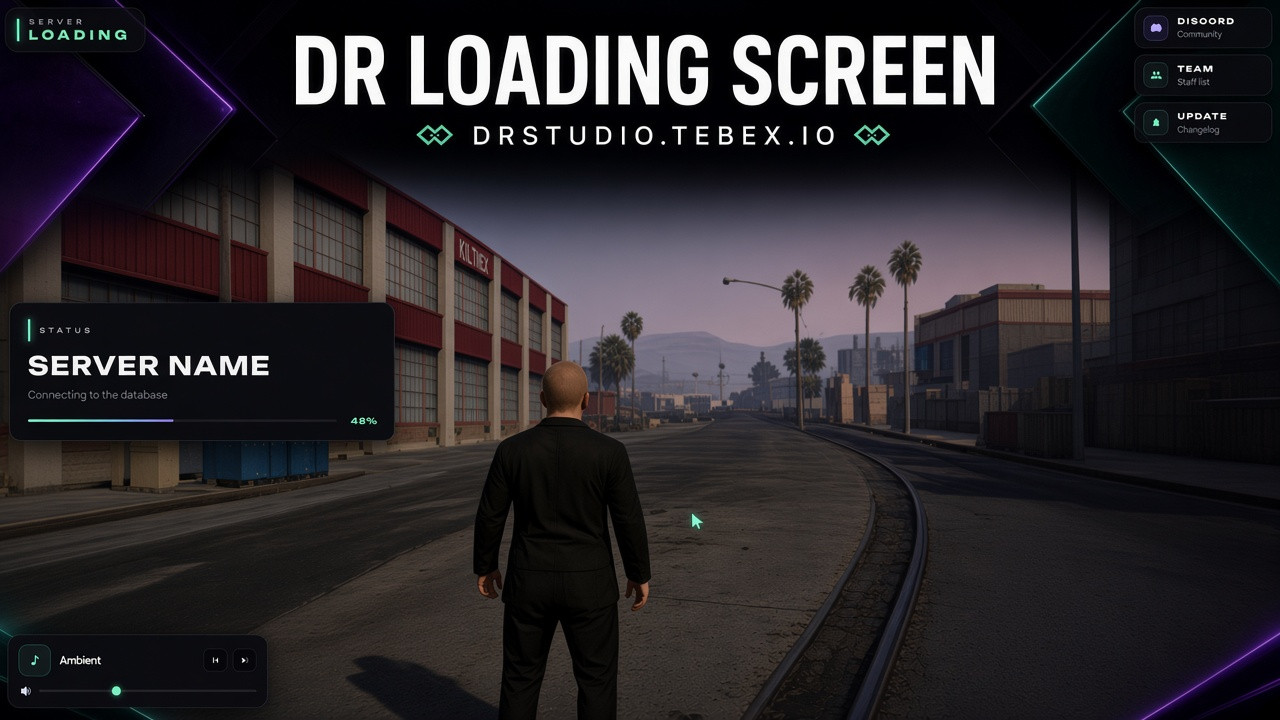
✦ Modern FiveM Loading Screen
Give your FiveM server a modern and professional loading screen designed to keep players informed and engaged while they wait to join.
Modern design. Useful information. Your server, all in one place.
🎨 Modern Loading Screen
The loading screen is designed with a clean and modern interface that can easily match your server's branding.
- Modern and clean UI
- Custom server branding
- Server logo
- Server information
- Loading progress
- Smooth animations and transitions
- Customizable colors
- Custom images
- Background music
- Responsive design
📰 Updates Panel
Keep your players informed before they even join the server.
The Updates panel can be used to display:
- 🆕 New updates
- 🔧 Fixes and changes
- 🚗 New vehicles
- 📦 New scripts
- 🎉 Events
- 📢 Important announcements
- 🛠️ Development updates
Each update can include its own title, description, date, and additional information.
Players can quickly see what has recently changed or been added to the server.
👥 Team Panel
Introduce your server team directly through the loading screen.
The Team panel allows you to display your team members together with their ranks.
For example:
[OWNER]
OwnerName
[DEVELOPER]
DeveloperName
[ADMIN]
AdminName
[MODERATOR]
ModeratorName
Each team member can display:
- Avatar
- Name
- Rank
- Role
- Short description
The team structure and displayed information can be customized to match your server.
🏷️ Custom Ranks
Create your own server staff structure and display the ranks that fit your team.
For example:
- 👑 Owner
- ⚙️ Developer
- 🛡️ Senior Admin
- 🔨 Admin
- 🔧 Moderator
- 💬 Support
- 🎨 Designer
Rank names, styles and appearance can be customized.
📊 Server Information
Give players useful information about your server while they are loading in.
You can display:
- Server name
- Discord
- Website
- Store
- Player count
- Server information
- Social media
- Rules
- Other custom information
🎵 Music & Media
Make the loading experience more immersive with custom music and media.
- Custom background music
- Volume controls
- Play / Pause
- Custom backgrounds
- Images
- Video or animated backgrounds
⚙️ Configuration
The loading screen is built with easy customization in mind.
Customize things such as:
- Logo
- Colors
- Background
- Music
- Server information
- Discord
- Website
- Store
- Updates
- Team members
- Team ranks
- Text
- Animations
- Loading bar
- Other UI elements
🚀 Give Your Server a Better First Impression
Modern design.
Better presentation.
More information for your players.
Create a professional first impression before your players even enter the server.
Chat PVP
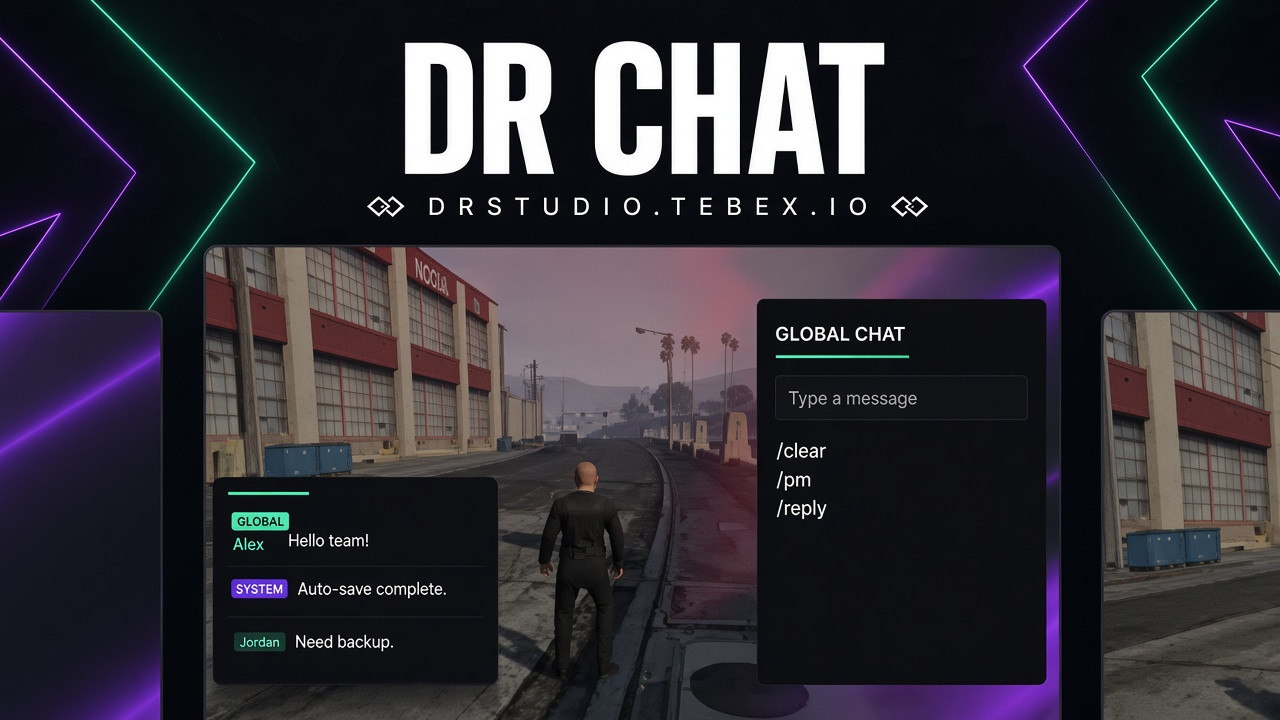
✦ Modern FiveM Chat
Dejte svému serveru moderní a přehledný chat, který nahradí základní FiveM chat čistým UI a přidá praktické funkce pro hráče i administraci.
Jednoduchý pro hráče. Přehledný pro staff. Přizpůsobitelný vašemu serveru.
💬 Moderní Chat UI
Chat je navržený tak, aby působil čistě a nerušil hráče při hraní.
- Moderní a přehledné UI
- Historie odeslaných zpráv
- Návrhy příkazů při psaní
- Přehledné zobrazování zpráv
- Podpora serverových oznámení
- Plně konfigurovatelný vzhled
🛡️ Moderace & Ochrana
Administrace má k dispozici nástroje pro rychlou správu chatu a ochranu před jeho zneužíváním.
- Anti-Spam ochrana
- Limit délky zpráv
- Filtrování zakázaných slov
- Ochrana proti HTML / nebezpečnému vstupu
- Mute / Unmute hráčů
- Vymazání chatu
- Konfigurovatelná oprávnění
- Moderátorské příkazy
📢 Serverová Oznámení
Využijte chat také jako informační systém pro váš server.
Administrátoři mohou posílat vlastní oznámení například pro:
- 📌 Důležité informace
- 📖 Pravidla serveru
- 🎉 Eventy
- 💬 Discord
- 🛒 Tebex / Store
- 🔔 Údržbu a restart serveru
Podporována jsou také automatická opakující se oznámení, takže nemusíte důležité informace posílat ručně.
👮 Staff & Role
Odlište administraci od běžných hráčů pomocí vlastních názvů a stylů staff zpráv.
Nastavit lze například:
[OWNER]
[ADMIN]
[MOD]
[SUPPORT]
Vzhled jednotlivých rolí je možné přizpůsobit podle vašeho serveru.
📋 Discord Logging
Volitelná podpora Discord logování umožňuje zaznamenávat důležité akce a zprávy mimo hru.
Mějte přehled o aktivitě v chatu a moderátorských akcích přímo ve vašem Discordu.
⚙️ Configuration
Chat je vytvořen s důrazem na jednoduchou konfiguraci.
Přizpůsobit můžete například:
- Vzhled UI
- Barvy
- Příkazy
- Oprávnění
- Staff role
- Zakázaná slova
- Anti-Spam limity
- Maximální délku zpráv
- Oznámení
- Discord logování
- Další nastavení chatu
🚀 Replace the Default FiveM Chat
Modernější vzhled.
Lepší přehlednost.
Více kontroly pro staff.
Vylepšete komunikaci na vašem FiveM serveru pomocí jednoduchého a moderního chat systému.
Notify
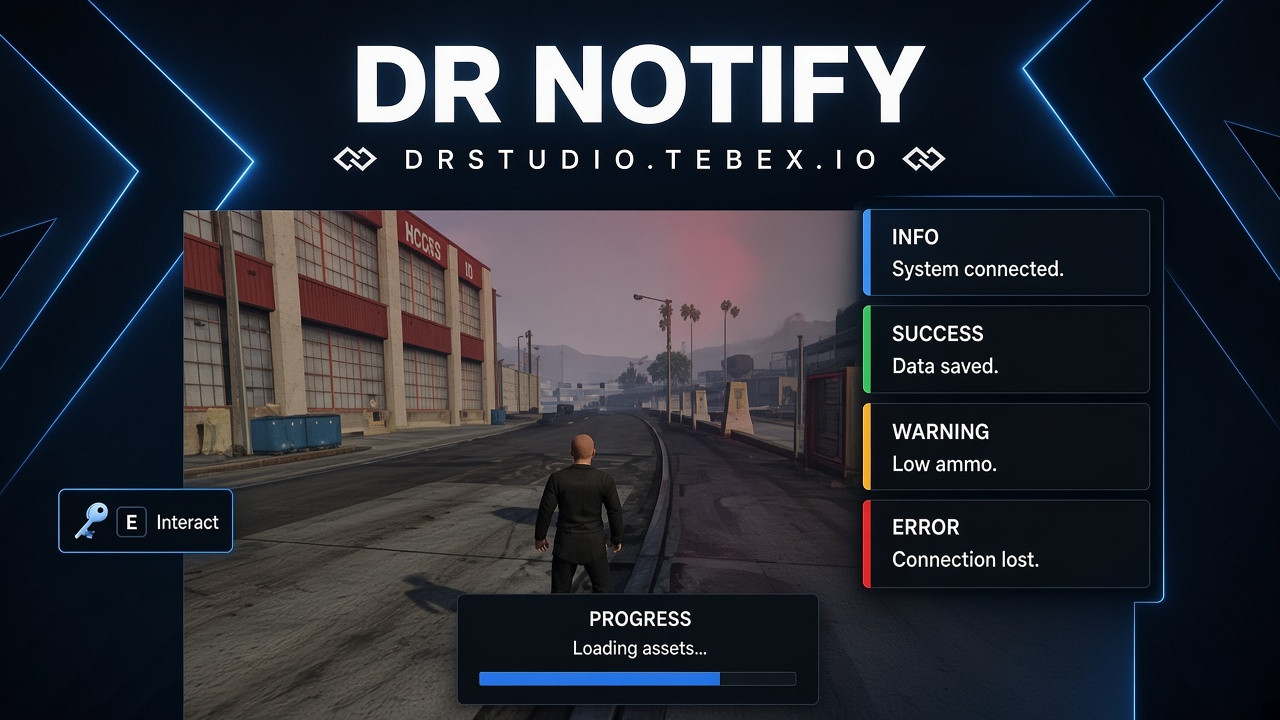
✦ Modern FiveM Notify
Give your FiveM server a clean and modern notification system with a simple interface, custom TextUI, Progress Bar and easy configuration.
Simple. Modern. Fully customizable.
🔔 Modern Notifications
Replace the default notifications with a custom notification system designed to fit your server's UI.
- Modern custom UI
- Clean animations
- Multiple notification types
- Easy to use
- Lightweight and optimized
- Fully configurable
💬 Custom TextUI
Display useful interaction information with a clean and modern TextUI.
Use it to show:
- Interaction keys
- Available actions
- Custom messages
- Player instructions
- Context information
The TextUI appearance can be customized to match your server's design.
📊 Progress Bar
A modern and customizable Progress Bar for actions and timed interactions.
Configure:
- Duration
- Colors
- Position
- Text
- Icons
- Animations
- Appearance
Perfect for jobs, interactions, crafting, actions and other timed activities.
🎨 Custom Appearance
Customize the look of your notifications, TextUI and Progress Bar directly from the configuration.
You can adjust:
- Colors
- Icons
- Position
- Size
- Duration
- Animations
- Notification types
- Text styling
- Progress Bar appearance
- TextUI appearance
- Other visual settings
Make the entire system match your server's branding and overall UI.
⚙️ Easy Configuration
Everything is designed to be simple to configure.
The config.lua allows you to quickly change the behavior and appearance without modifying the core script.
Configure:
- Notification position
- Display duration
- Colors
- Styles
- Animations
- Notification types
- TextUI
- Progress Bar
- Other settings
📦 Notification Types
Support different notification types for different situations.
For example:
- ✅ Success
- ❌ Error
- ⚠️ Warning
- ℹ️ Information
Each type can have its own custom appearance.
🚀 All Your UI Essentials in One
A lightweight UI system combining Notifications, TextUI and Progress Bar into one modern and customizable resource.
Easy to configure. Easy to use. Made to fit your server.
Kill feed
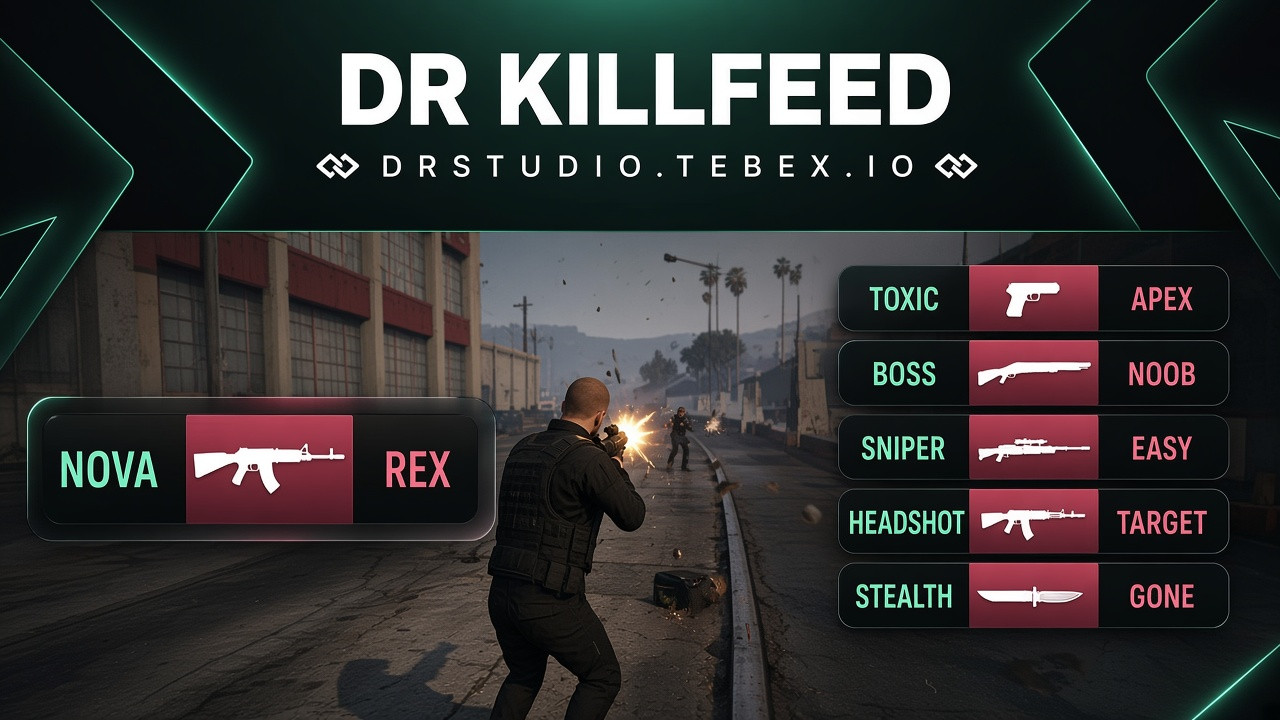
✦ Modern FiveM Killfeed
Give your FiveM server a simple and modern Killfeed that clearly shows who eliminated who.
Simple. Clean. Informative.
☠️ Simple Killfeed UI
Keep track of player eliminations with a clean and minimal UI.
The Killfeed displays:
- Killer name
- Victim name
- Kill information
- Multiple kills
- Recent eliminations
For example:
PlayerName → EnemyName
The Killfeed automatically updates whenever a player eliminates another player.
🎨 Clean & Modern Design
Designed to provide useful information without taking unnecessary space on the screen.
- Minimal UI
- Clean animations
- Easy to read
- Smooth updates
- Customizable appearance
- Lightweight design
⚙️ Easy Configuration
Customize the Killfeed directly through the configuration.
You can adjust:
- Position
- Display duration
- Maximum visible kills
- Colors
- Text appearance
- Animations
- Other UI settings
🚀 Know Who Eliminated Who
A simple Killfeed designed for PvP, competitive servers and event-based gameplay.
See the kill. See the players. Keep playing.
PVP Logs
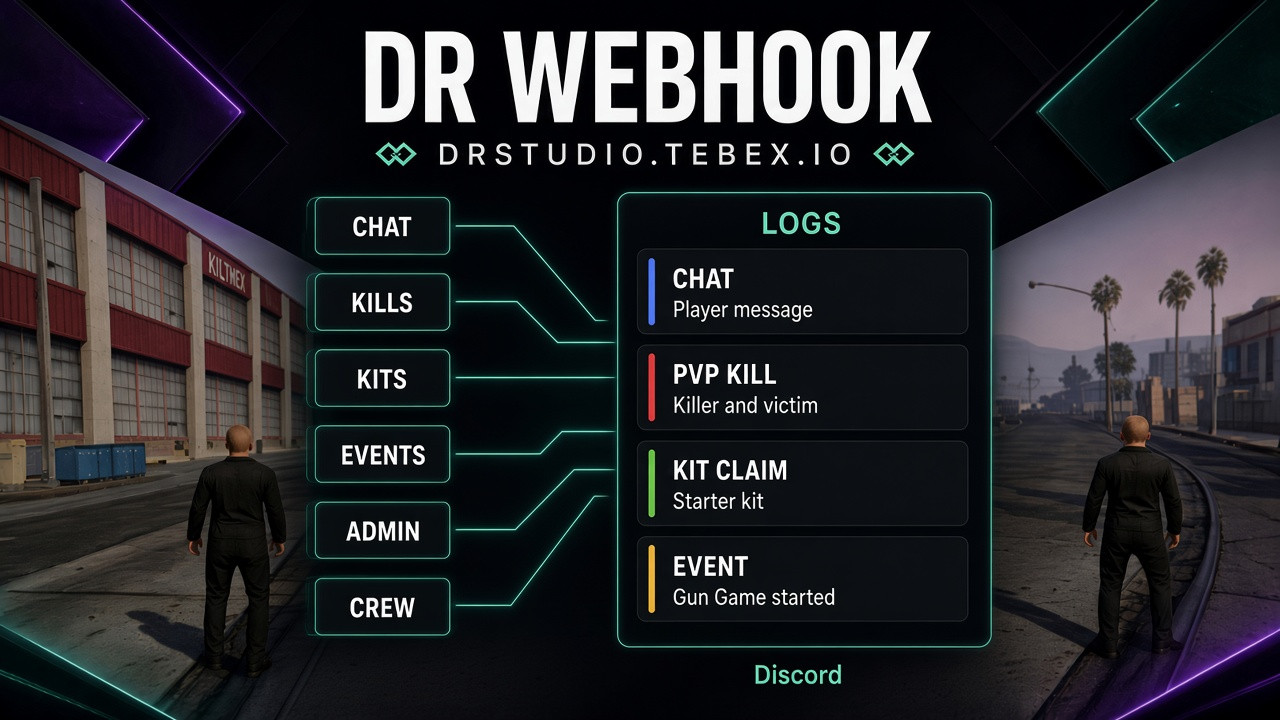
✦ Modern FiveM Logging System
Keep track of everything happening on your FiveM server with a powerful and fully configurable logging system.
The script is designed to centralize your server logs into one easy-to-manage system, giving you a complete overview of player activity, staff actions, resources and important server events.
One system. One configuration. Complete server visibility.
📋 Log Everything
Track important actions happening across your server and send them directly to Discord.
The system can be used to log events such as:
- 👤 Player actions
- 👮 Staff actions
- 🎫 Reports
- 🎁 Event Menu
- 🎟️ Battle Pass
- 💰 Economy actions
- 🎒 Inventory actions
- 🔫 Weapon actions
- 🚗 Vehicle actions
- 💼 Jobs
- 🏦 Banking
- 🛒 Shops
- 🛡️ Punishments
- 🔄 Relogs
- And much more
New logging categories can easily be added to your server as needed.
⚙️ One Central Configuration
No more searching through multiple resources just to change a Discord webhook.
The entire logging system can be configured from one central configuration file.
Manage your logs in one place, including:
- Discord Webhooks
- Log channels
- Enabled / disabled logs
- Log colors
- Log titles
- Log messages
- Player information
- Staff information
- Timestamps
- Resource-specific logs
- And more
Keep your server's entire logging setup organized and easy to maintain.
🔗 Resource Integration
The logging system is designed to work alongside your other resources.
Connect logs from systems such as:
Event Menu
Battle Pass
Reports
Admin Menu
Inventory
Vehicles
Jobs
Banking
Shops
Punishments
And many more.
This allows you to keep different systems connected to one centralized logging solution.
📡 Discord Logging
Important server activity can be sent directly to your Discord server using customizable webhooks.
Create separate channels for different types of activity, for example:
#player-logs
#admin-logs
#reports
#economy-logs
#vehicle-logs
#inventory-logs
#punishment-logs
Keep everything organized and easy for your staff team to review.
👮 Staff & Player Information
Logs can contain detailed information about the action that occurred.
Depending on the event, logs can include:
- Player name
- Server ID
- License / identifier
- Discord information
- Staff member
- Action performed
- Target player
- Amounts
- Items
- Vehicles
- Coordinates
- Timestamp
- Additional event information
Give your staff the context they need when reviewing server activity.
🎨 Custom Log Design
Make your Discord logs match your server's style.
Customize:
- Embed colors
- Titles
- Descriptions
- Footer
- Icons
- Webhooks
- Channels
- Logged information
- Message format
Create a consistent logging system across your entire server.
🔥 Built for Large Servers
Whether you are running a small community or a large FiveM server, the system provides a centralized way to monitor what's happening behind the scenes.
Instead of having separate logging systems scattered across different resources, bring everything together into one organized solution.
🚀 One Logging System. Everything You Need.
Monitor your server. Track important actions. Keep your staff informed.
From Reports and Battle Pass to Admin Actions, Economy, Inventory and Events — keep your server activity organized in one powerful Discord logging system.
Fully configurable. Centralized. Expandable. Built for your FiveM server.
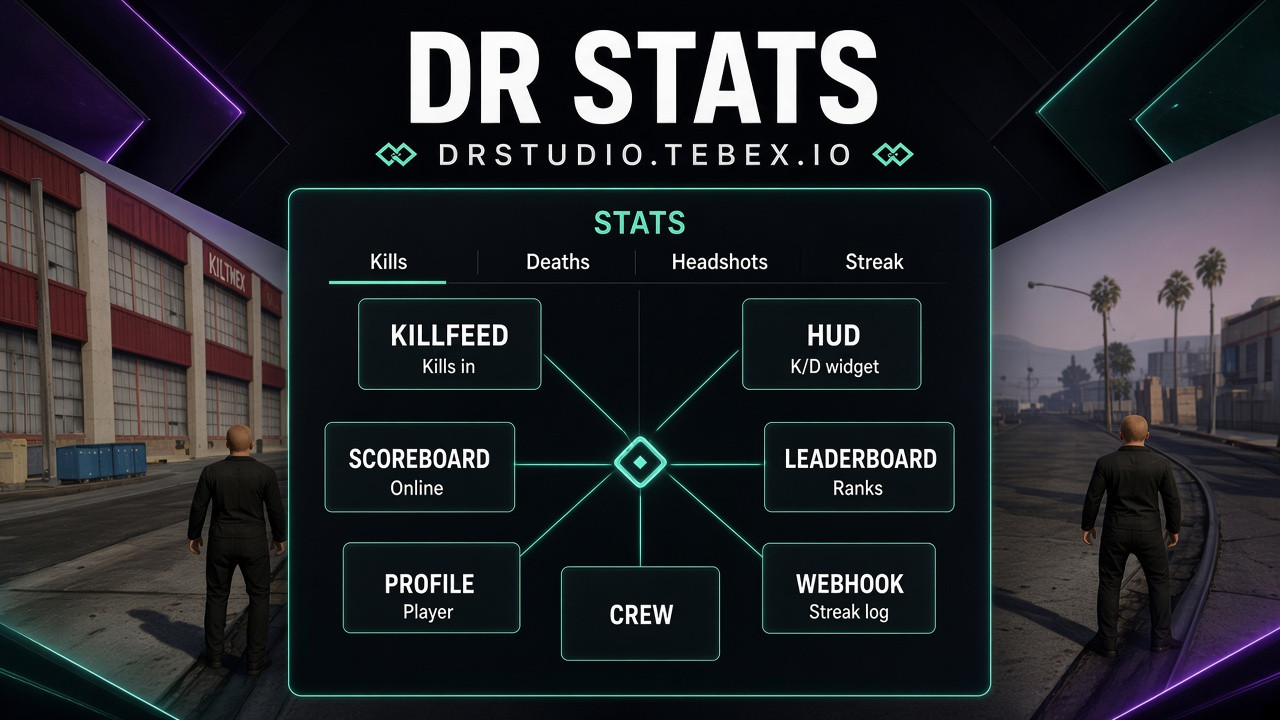
PVP Stats System
✦ Modern FiveM Stats System
A powerful statistics system designed to provide a shared data foundation for your FiveM server.
Stats System works as a central dependency for multiple resources that need player statistics, allowing scripts such as Killfeed, Scoreboard, Profile, HUD and many others to use the same player data.
One system. One source of statistics. Built for your entire server.
📊 Centralized Player Statistics
Instead of every script managing its own statistics, Stats System provides a centralized system that can be shared across your resources.
Track statistics such as:
- 💀 Kills
- ☠️ Deaths
- 🎯 K/D Ratio
- ⏱️ Playtime
- ⭐ Levels
- 💰 Economy-related statistics
- And other configurable statistics
🔗 Built for Other Resources
Stats System is designed to work as a foundation for other scripts that require player statistics.
It can provide data for systems such as:
- 🔫 Killfeed
- 🏆 Scoreboard
- 👤 Player Profile
- 🖥️ HUD
- 📊 Statistics menus
- 🏅 Leaderboards
- 🎮 Gameplay systems
- And many other resources
This allows your scripts to work with the same centralized player statistics.
⚙️ Easy Configuration
Manage your statistics from one centralized system instead of configuring the same data across multiple resources.
Configure:
- Available statistics
- Stat tracking
- Stat values
- Player data
- Database settings
- Resource integration
- And more
💾 Persistent Statistics
Player statistics can be stored and maintained between sessions, allowing players to keep their progress and historical data.
Whether a player reconnects later or uses a different resource, their statistics remain available to supported systems.
🚀 One Core. Multiple Systems.
Stop creating separate statistics systems for every resource.
Stats System provides a shared foundation for your server's statistics, making it easier for resources such as Killfeed, Scoreboard, Profile and HUD to access the information they need.
Centralized. Expandable. Reliable. Built for your FiveM server.
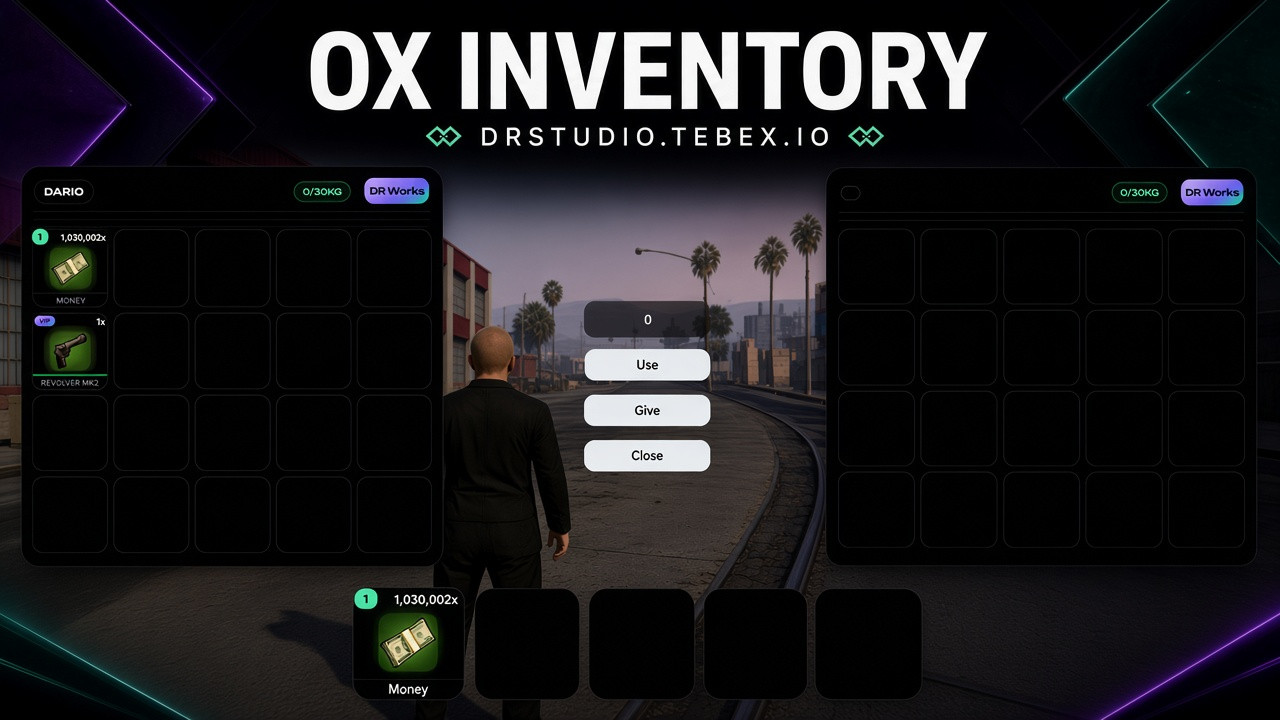
OX Inventory UI Reskin
✦ Modern OX Inventory UI Reskin
Give your FiveM server a fresh, modern and polished inventory experience with the OX Inventory UI Reskin.
This reskin focuses on the visual side of ox_inventory, featuring a redesigned inventory interface, numbered slots and a customizable VIP badge system for selected items.
Same ox_inventory. New look. More customization.
🎒 Modern Inventory Interface
Replace the original ox_inventory interface with a clean and modern design made for custom FiveM servers.
The redesigned UI includes:
- 🎨 Modern dark inventory design
- 📦 Redesigned inventory slots
- 🔢 Numbered item slots
- 🎒 Custom hotbar
- 💎 VIP item badges
- ⚡ Clean and minimal interface
- 🖥️ Modern item layout
- ✦ Custom visual elements
The entire interface is designed to keep your inventory clean, organized and easy to use.
🔢 Numbered Hotbar & Inventory Slots
The hotbar and inventory slots include position-based numbering from 1 to 5.
Each slot automatically displays its corresponding number based on its position.
For example:
1 → Slot 1
2 → Slot 2
3 → Slot 3
4 → Slot 4
5 → Slot 5
The same numbering system is also displayed on the corresponding inventory positions, making it easy for players to quickly identify and use their items.
💎 Customizable VIP Badge
The UI includes a customizable VIP badge system for highlighting selected items.
VIP items can be defined directly inside the index.html file.
This allows you to decide which items should display the VIP badge without changing the main inventory system.
Currently configured for:
-
WEAPON_REVOLVER_MK2 -
WEAPON_TECPISTOL -
WEAPON_AUTOSHOTGUN -
WEAPON_HEAVYSNIPER_MK2 -
WEAPON_GUSENBERG
The configured items will automatically receive the VIP badge inside the inventory.
You can easily change the listed items to match your own server's VIP system.
🎨 Complete UI Reskin
The reskin changes the visual appearance of the ox_inventory interface while keeping the original inventory system underneath.
The redesigned interface includes:
- Inventory layout
- Hotbar
- Item slots
- Slot numbering
- VIP badges
- Item information
- Buttons
- Interaction elements
- Overall UI styling
Everything is designed to create a consistent visual experience across the inventory.
⚡ Original Functionality
This product focuses on the UI and visual design of ox_inventory.
The reskin does not replace the core inventory system.
Your existing ox_inventory functionality remains handled by the original resource, including:
- Items
- Weapons
- Item usage
- Inventory management
- Weight system
- Hotbar functionality
- Shops
- Stashes
- Other ox_inventory features
The main focus of this product is the UI.
📦 UI Reskin Only
This product contains the files required for the visual reskin.
Included:
- Custom inventory UI
- Custom styling
- Redesigned hotbar
- Slot numbering
- VIP badge system
- UI visual elements
Not Included:
- New inventory system
- New gameplay mechanics
- Custom items
- Custom weapons
- Additional scripts
- VIP system itself
The VIP badge is simply a visual feature that allows you to highlight selected items.
🔗 Easy Customization
The VIP item list can be adjusted directly inside index.html.
This allows you to easily replace the default weapons with your own items.
For example, you can use the badge for:
VIP Weapons
Premium Items
Event Items
Exclusive Items
Custom Rewards
Customize the UI to match your own server and economy.
🖥️ Clean & Modern Design
The interface combines a dark minimal design with subtle neon elements, creating a modern appearance while keeping the inventory easy to navigate.
Perfect for:
RP Servers
PVP Servers
Serious RP Communities
Modern FiveM Servers
🚀 Same System. Completely New Inventory.
Give your ox_inventory a completely refreshed visual identity while keeping the original inventory functionality.
Modern UI. Numbered slots. Custom VIP badges. Clean design.
A complete visual reskin for servers that want their inventory to stand out.
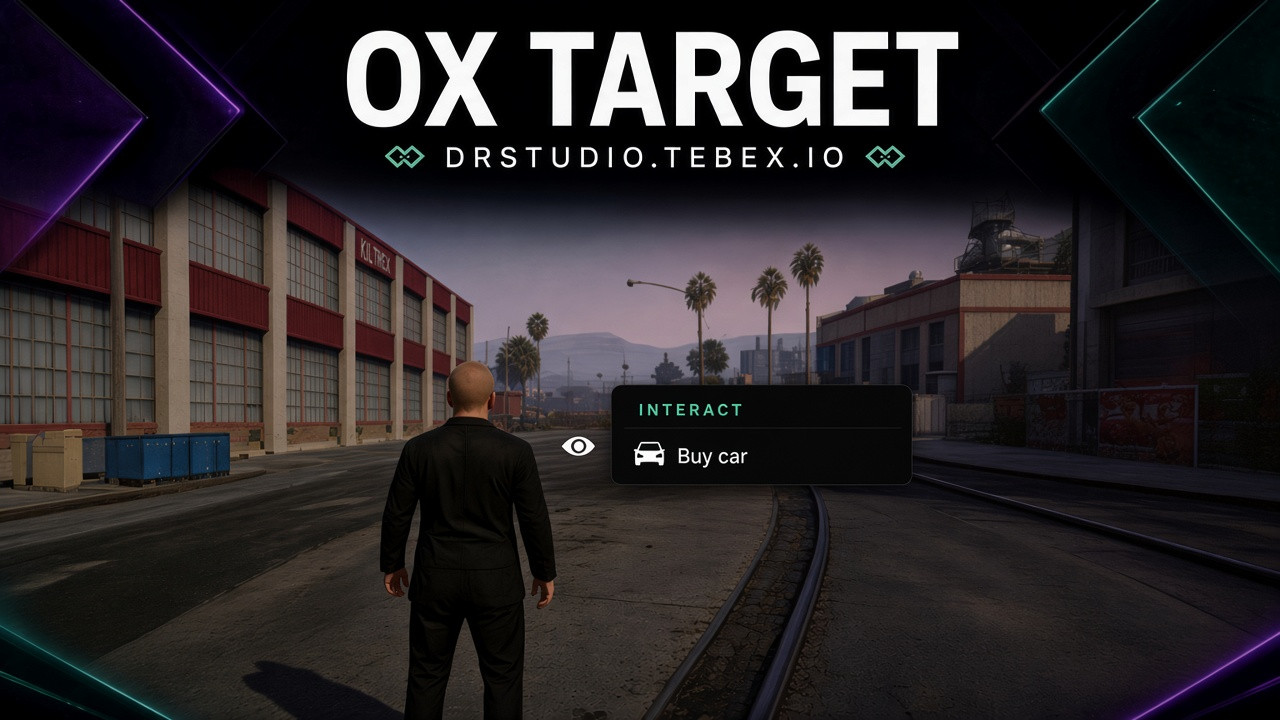
OX Target UI Reskin
✦ Modern OX Target UI Reskin
Give your FiveM server a fresh, modern and polished look with the OX Target UI Reskin.
This reskin focuses entirely on the visual side of ox_target, replacing the original interface with a modern and stylish design while keeping the original functionality of the system intact.
Same ox_target. New look. Better experience.
🎯 Modern Interaction Menu
Replace the original ox_target interface with a modern interaction menu designed for today's FiveM servers.
The new UI includes:
- 👁️ Custom interaction indicator
- 📋 Modern interaction menu
- 🔢 Numbered interaction options
- ✦ Highlighted selected option
- 🌑 Modern dark design
- 💎 Neon-style elements
- ⚡ Smooth and subtle visual effects
- 🖥️ Clean and easy-to-read layout
Keep all interactions simple, clear and easy to use.
🎨 Complete UI Reskin
The reskin completely changes the visual appearance of the ox_target interface.
The following elements are redesigned:
- Interaction indicator
- Interaction menu
- Option selection
- Menu background
- Borders
- Highlight effects
- Typography
- Icons and visual elements
- Overall UI appearance
Everything is designed to work together as one consistent and modern interface.
⚡ Original Functionality
This product is focused entirely on the visual appearance of ox_target.
The reskin does not change the original functionality of ox_target.
Your existing:
- Target zones
- Entity interactions
- Vehicle interactions
- Ped interactions
- Object interactions
- Interaction options
- Distance settings
- Job / group permissions
- Other ox_target settings
remain unchanged.
Only the UI is redesigned.
📦 UI Files Only
This product contains only the files required for the UI reskin.
It is not a new target system or a modified version of the entire ox_target resource.
Included:
- Custom UI files
- Custom styling
- Custom interaction design
- Required visual elements
Not Included:
- New ox_target functionality
- New target features
- New interaction systems
- Additional gameplay scripts
🔗 Easy Integration
The reskin is designed to be used with your existing ox_target installation.
Simply replace the relevant UI files with the files included in this reskin and continue using ox_target as normal.
No complicated systems or additional configuration are required.
🖥️ Clean & Modern Design
The interface combines a dark design with subtle neon elements, creating a modern look while keeping the UI clean and easy to understand.
The design is suitable for:
RP Servers
PVP Servers
Serious RP Communities
Modern FiveM Servers
🚀 Same System. Completely New Look.
Give your ox_target a new visual identity without changing the system itself.
Modern UI. Clean design. Original functionality.
A simple UI reskin for servers that want their interactions to look better.